
Troubleshooting Modem Access FAQs
These are some tips that will help you access your modem/router.
What can I do if I’m struggling accessing my modem’s login page?
- Restart the modem (do not reset yet). Some modem glitches can be resolved just by switching it off and on to refresh the connection.
- Check the connectivity of your device to your modem:
- Check if your device is connected to the Wi-Fi of the modem/router.
- f you are trying to access the modem using your mobile phone, try switching off the mobile data, then try again.
- If you are trying to access the modem using your laptop or Mac, make sure that the IP address settings on your device are set to "obtain IP address automatically" or "DHCP."
- If you have an NBN-modem-router setup at home, make sure that you connect your device directly to the modem first.
- Try using a different browser or incognito/private browsing. Some cached files on your default browser might interfere with the connection to your modem's interface.
- If all else fails, reset the modem. Look for the reset button, use a pin to push and hold it in until all the lights have turned off. Wait for the modem lights to come back on, then try accessing the modem using its default login credentials.
- If you are still unable to access your modem, please contact us.
What can I do if the username/password are not working?
- Confirm that you are using the modem's default username/password by checking the label/sticker (usually located at the bottom), or the modem's manual (can be searched online).
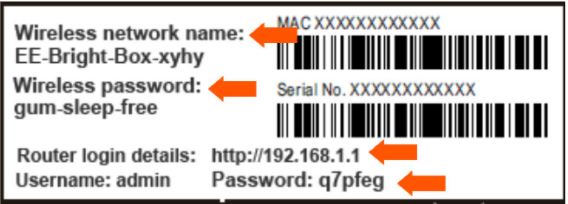
- Refer to the above screenshot:
- Modem's URL/IP address to access its user interface
- Username and Password to be used to log in to the modem's interface
- Wi-Fi Name and Password
- Do you recall modifying your modem's default settings before subscribing to amaysim? You might have written them down on a piece of paper somewhere.
- If all else fails, reset the modem. Look for the reset button, use a pin to push and hold it in until all the lights have turned off. Wait for the modem lights to come back on, then try accessing the modem again using its default login credentials.
- If you are still unable to access your modem, kindly contact us.
What if my modem has different options/buttons compared to the screenshots in the guides?
- Resetting your modem won't work on every occasion. There are a few cases where your modem's administration rights might be locked by your previous provider. Most likely, your modem has a customized admin username and password that were set by them. You can try calling them to ask for the modem's credentials.
- Your modem is the same make and model but has different firmware. Just like the apps on your mobile phone that change their layout when updating from an old version to the latest, it doesn't mean that we need to update anything on your modem. Try to explore your modem's interface first, and you might just find the attributes you are looking for.
- If you are still unable to configure your modem, please contact us.